
Historical release reference: This page documents Gravity Geolocation 3.5 RC6. For current products, see the pricing page and documentation. The current Geolocation + Search Bundle provides Gravity Geolocation - Toolkit and Gravity Search as two downloads under one license. Eligible legacy licenses retain their combined-plugin download. The original release details below are preserved for reference.
Gravity Geolocation 3.5 RC6 is now available for testing.
This release candidate brings together the work completed throughout the Gravity Geolocation 3.5 beta cycle: a rebuilt and expanded collection of geolocation fields, the standalone Gravity Search product, a simpler way to manage WPGeo-powered plugins, and a clearer choice of packages.
RC6 is close to the planned stable release, but it is still prerelease software. If you would like to help test it, please use a staging or development site and create a complete backup first.
A clearer product lineup
The most visible change in RC6 is a clearer product structure. You can choose the tools your site needs without purchasing advanced geolocation and frontend search features together.
- Gravity Geolocation (Starter) provides the core location fields for Gravity Forms, including Geocoder, Address, Coordinates, Map, Locator Button, and Reset Location Button.
- Gravity Geolocation Pro includes every Gravity Geolocation field, plus Address Validation, Directions, Distance & Duration, Nearest Locations, Drawing Tools, Single Entry Map, and Mashup Map.
- Gravity Search is a standalone product for searching, filtering, mapping, and displaying existing Gravity Forms entries on the frontend. It does not include the geolocation fields used to collect new locations.
- All Access combines Gravity Geolocation Pro and Gravity Search for the complete location collection, search, map, and display workflow.
These are alternative packages of the same plugin, not separate add-ons to install beside one another. You install one package at a time, and changing packages replaces the existing build without creating a second Gravity Geolocation plugin.
The new product names do not change an existing customer’s renewal terms, lifetime status, or licensed number of sites. When RC6 is available for your license, your account and the WPGeo Dashboard will offer the appropriate package.
Gravity Search is now available as a standalone product
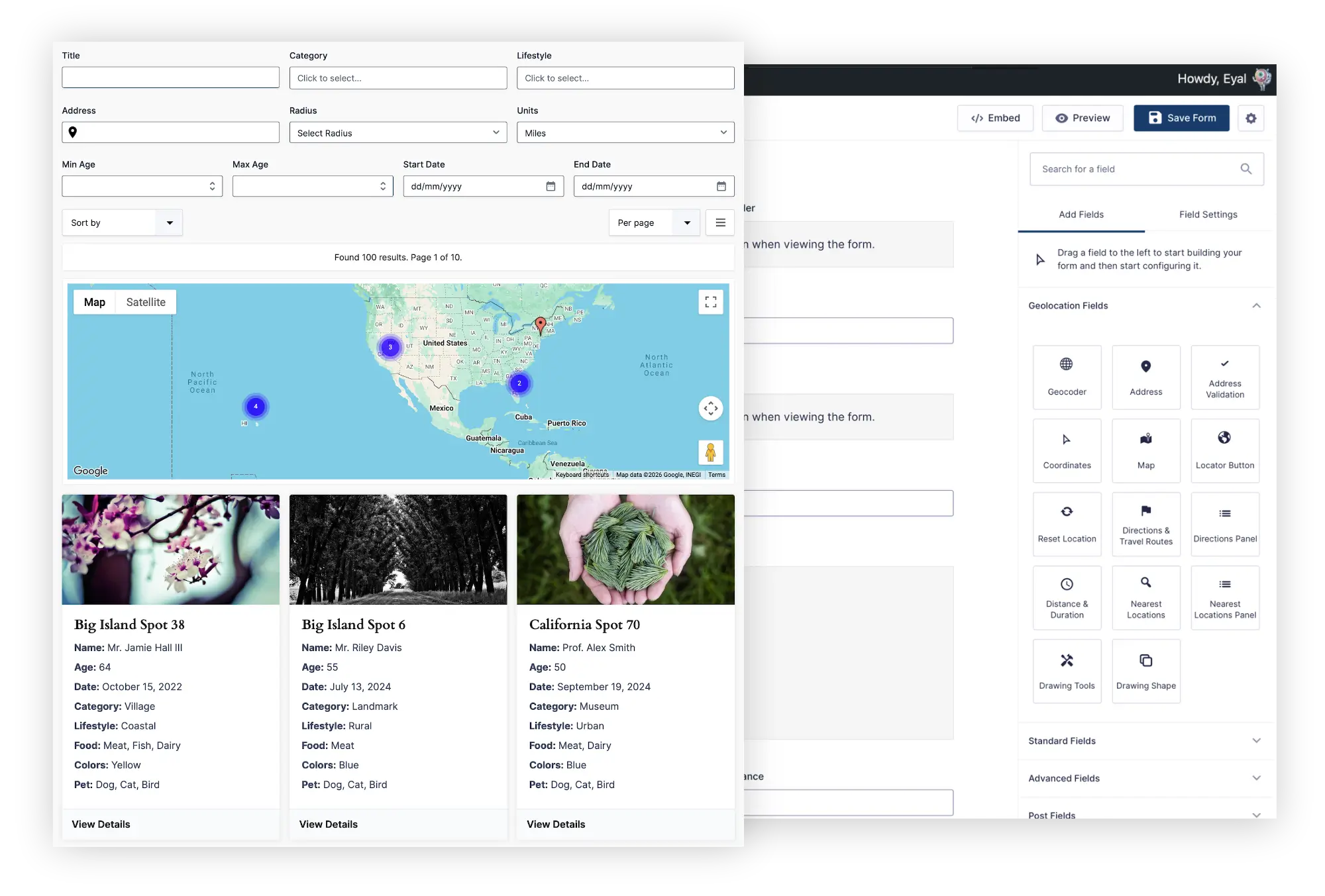
Gravity Search turns Gravity Forms entries into searchable directories, listings, store locators, member directories, customer portals, and other frontend displays.
It can search ordinary Gravity Forms fields and entry information, so location features are not required. When location data is available, you can also add maps, markers, proximity search, and distance-based sorting.
A Gravity Search setup can be as simple or as detailed as the project requires:
- Display a list or table of entries that loads automatically.
- Add visitor-facing filters and automatic or manual submission.
- Offer sorting and results-per-page choices.
- Add a map and proximity controls when location search is useful.
- Optionally link results to individual entry details pages.
The search form, location sources, map, proximity controls, and entry details page are all optional. For example, you can create a simple directory that displays predefined entries without showing a search form or linking to a separate details page.
Start with the Gravity Search overview, or follow the first Search setup guide.
A more helpful Gravity Search setup experience
RC6 also includes a major refinement of the Gravity Search settings experience. Search Settings now use familiar Gravity Forms-style tabs, with clearer relationships between Search Setup, filters, initial results, the visitor search form, results, maps, and optional entry details.
A compact Search Readiness panel appears throughout the settings area. It shows which major components are in use and highlights only the issues that actually prevent a Search from working. Optional components are shown as not in use instead of making an otherwise valid Search appear incomplete.
Other usability improvements include:
- A Save Settings button beside Preview.
- Structured Sort Options and Per Page Options instead of raw text fields.
- Clear dependency guidance when a feature needs a saved setting from another tab.
- Visible but disabled details-link controls until a Details Page is selected.
- Direct helpers for editing a Details Page and copying the required shortcode.
- Dedicated Searches and New Search links alongside the standard Gravity Forms navigation.
Manage WPGeo-powered plugins from one dashboard
The refined WPGeo Dashboard provides one central place in your site’s dashboard for discovering, installing, activating, and managing plugins built on WPGeo Framework.
After connecting your GEO my WP account, you can review the licenses and packages available to that account and install an eligible package without downloading and uploading ZIP files manually. The current stable version remains the normal choice, while eligible release candidates can be selected intentionally for testing.
[Image placeholder: A focused screenshot of the WPGeo Dashboard showing the Gravity Geolocation card, connected account status, package selector, and the option to install an eligible release candidate. Crop out unrelated site navigation where practical.]
WPGeo Framework is included
WPGeo Framework supplies the shared mapping, geocoding, licensing, and dashboard foundation used by Gravity Geolocation and other compatible WPGeo-powered plugins.
It is now included directly inside the Gravity Geolocation package, so most customers have only one plugin to install and update. If another compatible plugin is active, both products can safely use the same shared framework runtime.
More of what is coming in Gravity Geolocation 3.5
The complete 3.5 release cycle includes much more than packaging and dashboard changes. Depending on the package you use, it introduces:
- Distance & Duration calculations powered by the current Google Routes API.
- Address Validation for reviewing and confirming submitted addresses.
- Nearest Locations fields for finding and displaying locations closest to an entered address or coordinates.
- Drawing Tools and Drawing Shape fields for collecting markers, lines, and shapes on a map.
- Expanded Single Entry and Mashup Map capabilities.
- A rebuilt, package-aware foundation designed to make future improvements easier to deliver.
- A dedicated migration process for preserving existing 3.2.x settings, forms, fields, and saved location data.
Gravity Geolocation 3.5 RC6 has been prepared for WordPress through version 7.1 and tested with the current Gravity Forms 3 workflows.
How to test RC6 safely
- Create a complete backup of your website and database.
- Use a staging or development copy of the site.
- Install the RC6 package offered for your license through your account or WPGeo Dashboard.
- Open and submit your important Gravity Forms, then verify saved entries, maps, feeds, notifications, and custom integrations.
- If you use Gravity Search, test filtering, initial results, sorting, pagination, maps, and any configured entry details pages.
- Confirm that Places API (New) and Routes API are enabled for the features that require them.
For API setup help, see the Google Maps API keys guide.
Download Gravity Geolocation 3.5 RC6
Existing customers can find eligible Gravity Geolocation 3.5 RC6 packages in their account under File Downloads or through the connected WPGeo Dashboard.
Please remember that RC6 is still prerelease software. Use it on staging first and verify the workflows that matter to your site before installing it in production.
If you encounter a problem or have a workflow you would like us to test before the stable release, please contact support. Clear reproduction steps, screenshots, and details about the form or Search configuration are especially helpful.