
Address autocomplete and address validation are often described as if they solve the same problem. They do not.
Address autocomplete helps a visitor enter and select a location. Address validation evaluates the completed address and can recommend a standardized correction.
A simple contact or location form may only need autocomplete. A delivery, shipping, registration, or onboarding workflow may benefit from using autocomplete first and validation before submission.
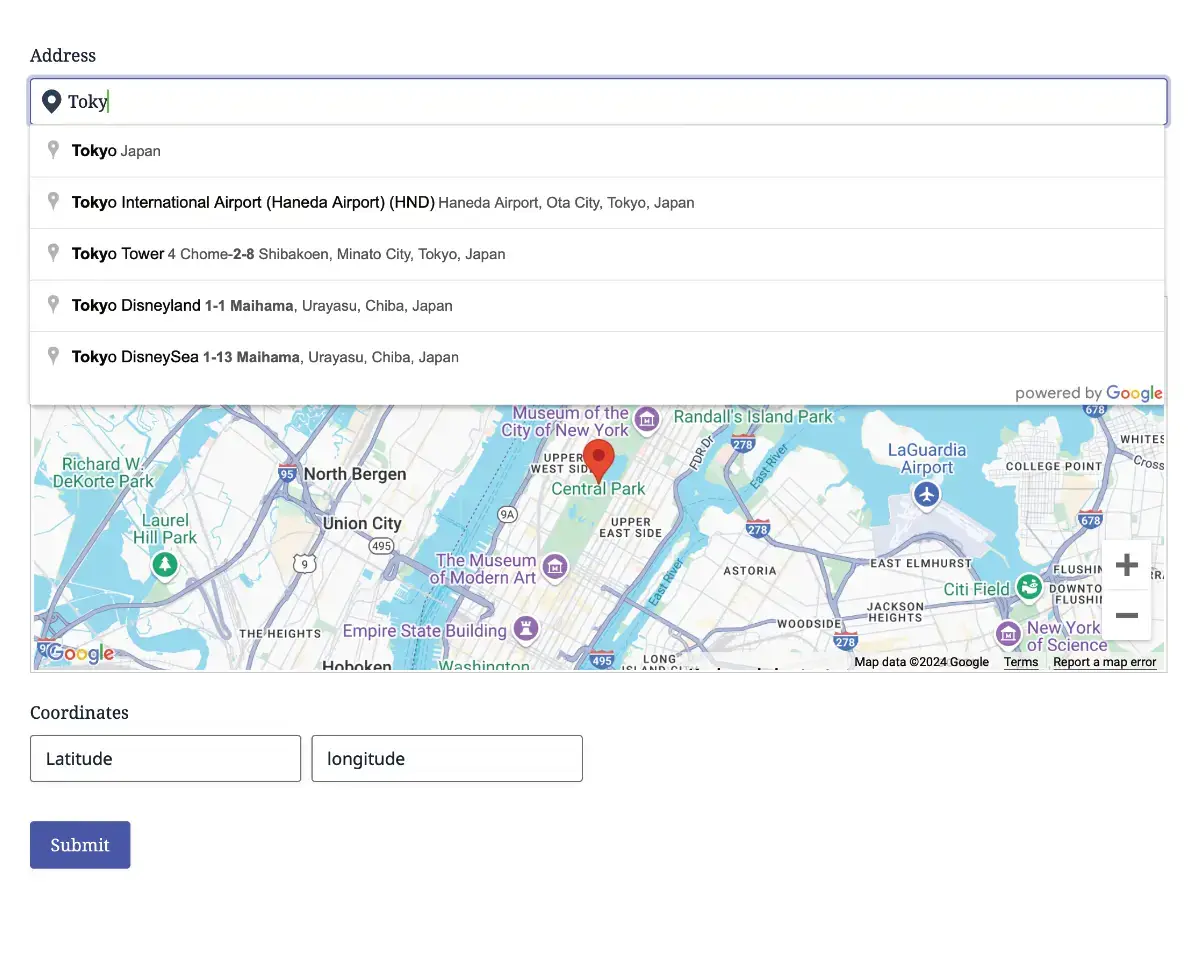
The Difference at a Glance
| Capability | Address Autocomplete | Address Validation |
|---|---|---|
| Main job | Help the visitor find and select an address | Review, standardize, and verify the entered address |
| When it runs | While the visitor types | After an address has been entered or geocoded |
| Visitor experience | Suggestion dropdown | Comparison and confirmation workflow |
| Primary Google service | Places autocomplete | Address Validation API |
| Coordinates and place data | Available from the selected place | Can return validation and standardized address data |
| Recommends corrections | No dedicated review workflow | Yes |
| Best for | Fast entry, geocoding, maps, and location selection | Shipping, delivery, CRM quality, registration, and service operations |
What Address Autocomplete Does
Autocomplete displays matching places as the visitor types. When the visitor selects a suggestion, Gravity Geolocation can geocode the place and synchronize its formatted address, address components, coordinates, and map position.
Autocomplete is valuable because it:
- Reduces the amount of typing required
- Helps disambiguate similar place names
- Provides coordinates for maps and proximity workflows
- Supplies structured address components
- Can restrict suggestions by country, location, proximity, or bounds
You can also require visitors to select one of the suggestions. That is useful when the form must receive geocoded place data rather than unstructured text.
However, selection enforcement does not turn autocomplete into full address validation. It confirms that the visitor selected a suggested place; it does not provide the same standardized-address review and validation metadata.
Read How to Add Google Address Autocomplete to Gravity Forms for the complete setup.
What Address Validation Does
The Address Validation Field evaluates the address through the Google Address Validation API. It can present the address entered by the visitor alongside a recommended standardized version and let the visitor confirm how to proceed.
This adds a deliberate review step for problems such as:
- Incomplete addresses
- Incorrect or inconsistent postal codes
- Formatting variations
- Missing address components
- Address values that should be standardized before entering another system
The result can be saved with the entry and selected validation values can be passed to compatible standard Gravity Forms fields through Dynamic Location Data.
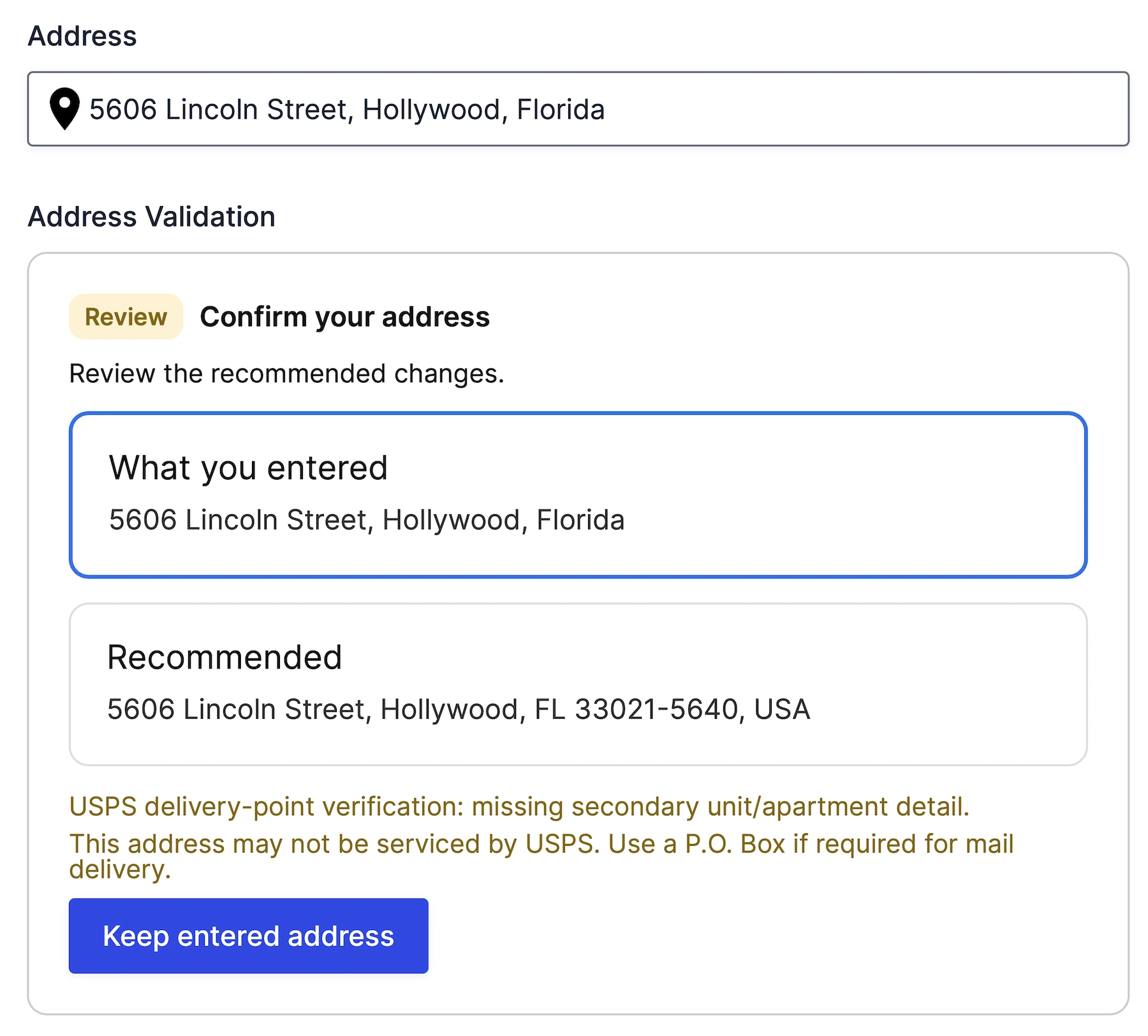
See the Address Validation solution and Address Validation Field documentation.
When Autocomplete Is Enough
Autocomplete may be sufficient when the primary goal is to identify a geographic place rather than verify a mailing or delivery address.
Examples include:
- Selecting a map location
- Searching for nearby stores
- Providing an origin or destination for directions
- Collecting event or property locations
- Capturing coordinates for a directory
- Filling a general contact form where exact deliverability is not operationally critical
In these cases, speed and reliable geocoding may matter more than a separate address-review step.
When Address Validation Is Worth Adding
Add validation when an inaccurate address creates real cost, delay, or manual cleanup.
Examples include:
- Physical deliveries and shipments
- Customer onboarding and CRM records
- Membership and registration databases
- Bookings and appointments at customer locations
- Home-service and field-work requests
- Applications that require standardized location data
Validation is also useful when data flows into several downstream systems. Correcting the address once in the form is usually easier than reconciling different versions later in a CRM, fulfillment tool, spreadsheet, or notification workflow.
Why Many Forms Should Use Both
Autocomplete and validation work well as two stages of one experience:
- Autocomplete: the visitor finds and selects the intended address quickly.
- Geocoding: the form receives coordinates and structured address information.
- Validation: the completed address is evaluated and a standardized recommendation can be shown.
- Confirmation: the visitor reviews the recommendation before the form is submitted.
This sequence combines a faster input experience with a stronger data-quality check. It is particularly useful when the form also calculates delivery distance, routes a request to a nearby location, or sends address data to another system.
Example: Delivery Request Form
Consider a local delivery form:
- The customer enters a destination with autocomplete.
- The selected address supplies coordinates for a distance calculation.
- Address Validation asks the customer to review any standardized recommendation.
- The validated destination becomes the address used for the order.
- Distance & Duration supplies the numeric value used to calculate the delivery fee.
Each feature has a different job: autocomplete improves entry, validation improves address quality, and Gravity Directions calculates travel.
Example: Store Locator
A store locator may only need autocomplete for the visitor’s search origin. The goal is to turn a city, postcode, or address into coordinates and find nearby results. Validating the visitor’s address for postal delivery may add friction without improving the locator experience.
This is why validation should be applied according to the business problem rather than added automatically to every address input.
Package Options
- Gravity Location: address autocomplete, geocoding, coordinates, form-input maps, current-location tools, and Dynamic Location Data.
- Gravity Directions: the address and geocoding fields required for route and travel workflows, together with distance, duration, route maps, and directions.
- Gravity Geolocation Toolkit: everything in Gravity Location and Gravity Directions, plus Address Validation, Nearest Locations, Drawing Tools, Single Entry Map, and Mashup Map.
- Geolocation + Search Bundle: everything in Toolkit plus Gravity Search.
If autocomplete is the only advanced address requirement, Gravity Location is the focused choice. If the form needs both autocomplete and Address Validation, choose Gravity Geolocation Toolkit or Bundle.
Frequently Asked Questions
Is Google address autocomplete the same as address validation?
No. Autocomplete suggests matching places while the visitor types. Address Validation evaluates the completed address and can recommend a standardized alternative.
Does requiring an autocomplete selection validate the address?
No. It ensures that the visitor selected a suggested place rather than leaving only manually typed text. Full validation is a separate workflow.
Should every form use both?
No. Use both when address quality has an operational impact. For general location selection, map input, directions, or proximity search, autocomplete alone may be enough.
Can the visitor keep the original address?
The Address Validation workflow can be configured to let the visitor review the entered and recommended addresses and choose how to proceed according to the form’s settings.
Can validation results populate other Gravity Forms fields?
Yes. Dynamic Location Data can copy supported validation outputs into compatible Gravity Forms fields for notifications, conditional logic, integrations, and other workflows.
Choose the Right Address Workflow
Use autocomplete to help visitors enter a location quickly. Add Address Validation when the completed address must be reviewed and standardized before it enters your delivery, customer, registration, or service workflow.
Explore Gravity Location, learn about Address Validation, or compare Gravity Location, Toolkit, and Bundle.